Classic or Atlas: build your site by clicking or by talking
A card starts the 15-day trial, nothing is charged during it, and the plan price starts 15 days after you add your card, unless you cancel.
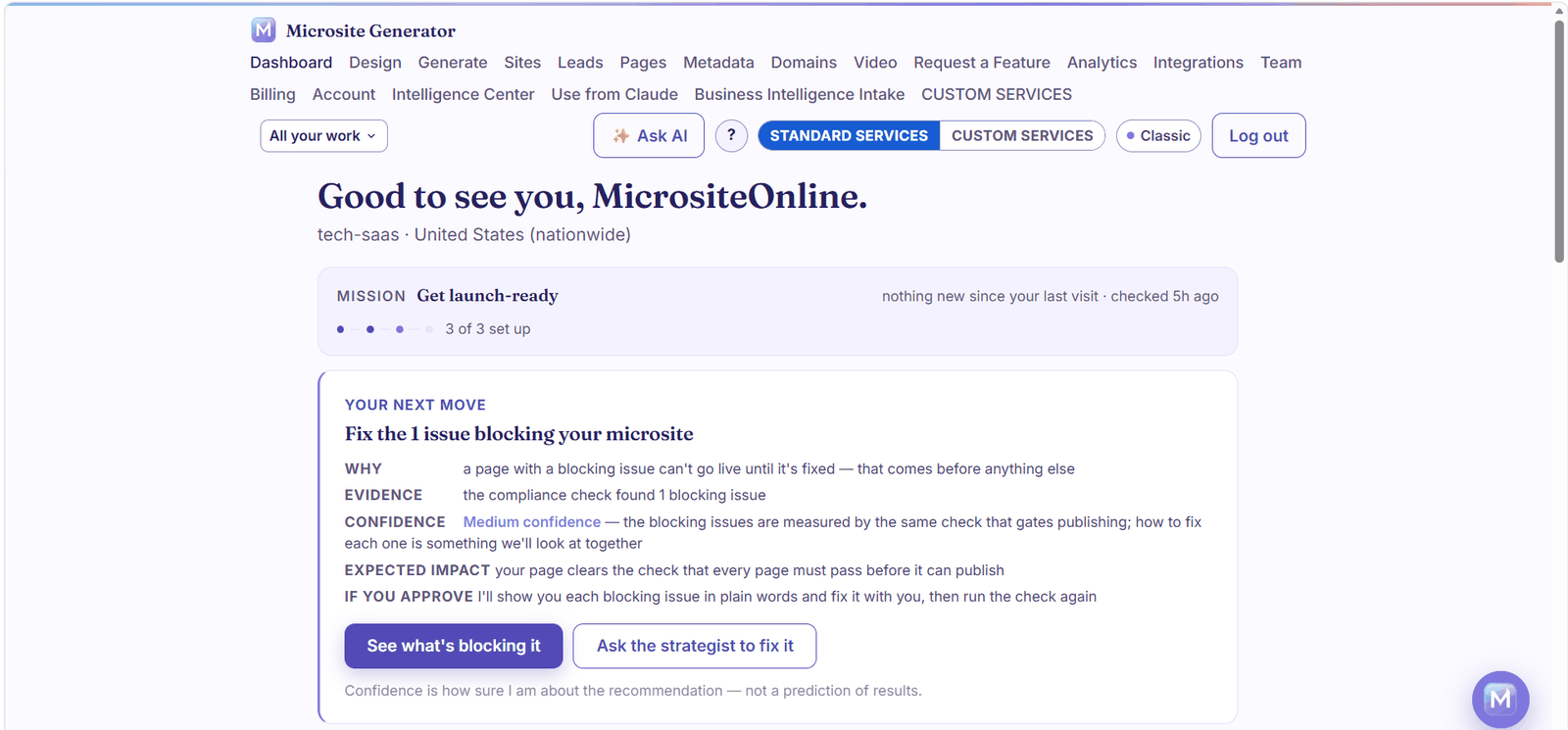
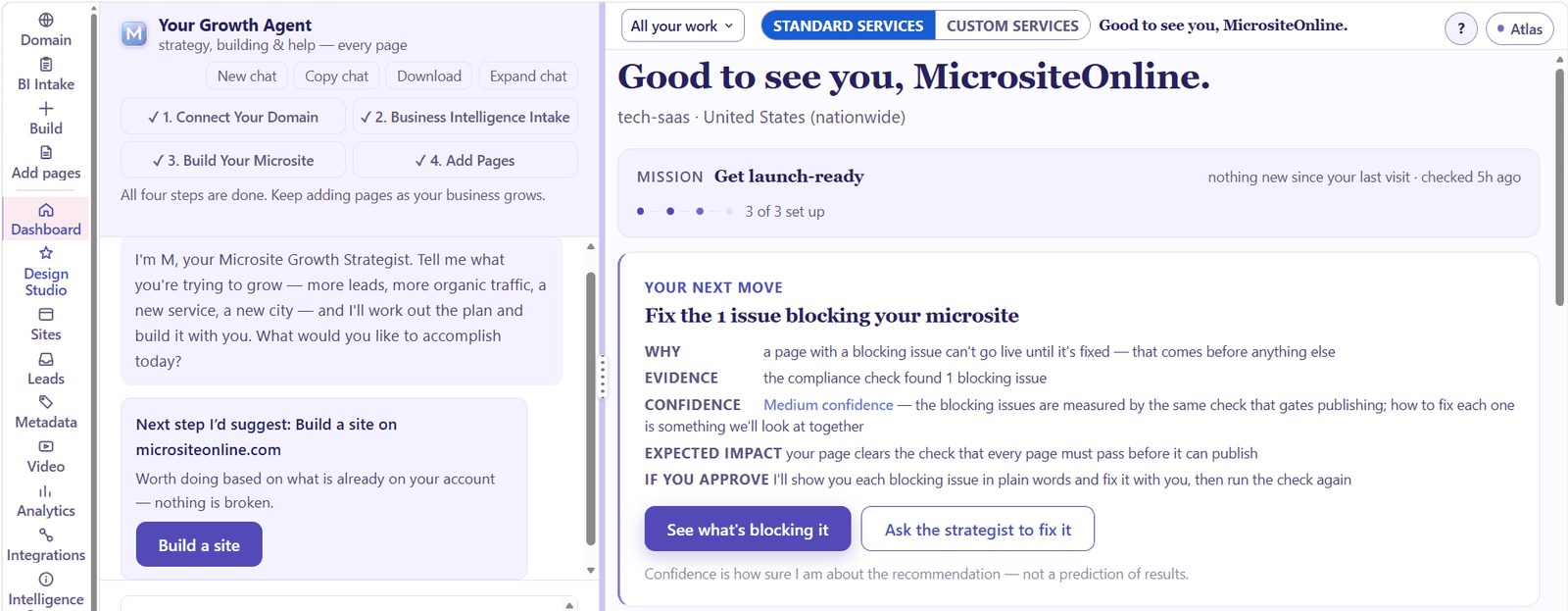
Two ways to work, one account
Some people like to see every option laid out. Others would rather say what they want and watch it happen. Microsite Generator doesn't make you pick one for good. Classic and Atlas show the same account, the same sites, the same leads and the same plan. Only the way you work changes, and the switch sits at the top of every page.
Classic: everything in the menu
Classic is the form-and-menu view. Every screen is one click away in the top menu: Design, Sites, Leads, Pages, Metadata, Domains, Analytics, Integrations, Billing and the rest. You fill in fields, press buttons and see the result.
You still have help when you want it. Ask AI opens a panel beside the screen you are on, and the rest of the screen stays live while you talk.
Classic suits you if you know where things are, you like to check every field yourself, or you are making one quick change.
Atlas: say what you want
Atlas is the conversational view. Your Growth Agent sits on the left, the screen you are working on stays open on the right, and a slim rail of icons takes you to any screen.
Tell it what you are trying to grow, such as more leads, a new service or a new city, and it works out a plan and builds it with you. Across the top it tracks the four steps to a finished site: connect your domain, the Business Intelligence Intake, build your microsite, and add pages.
Before your Growth Agent changes anything on your website, it tells you what it will change and waits for your go. The page on what your Growth Agent can do lists what it can read, change and explain.
Atlas suits you if you would rather describe the result than hunt for the setting, you are building your first site, or you want a strategist working beside you.
The same check, whichever view you use
Look closely at both screenshots. The same card appears in each: one issue is blocking this microsite, and the page can't go live until it is fixed.
That is the point. The view changes how you work, but it never changes the rules. Every page is checked against the publish check's 53 checks before it goes live, and a page that fails a must-pass check does not publish, in Classic or in Atlas. Read how the compliance check works.
Switch any time
Nothing is locked in. Start a site in Atlas by talking it through, then switch to Classic to adjust a meta description field by field. Switch back when you want the agent again. Your work stays where it is.
Which one should I start with?
- First site, or not sure where to begin: start in Atlas. The Growth Agent asks about your business and builds from your answers.
- Making a precise edit you already have in mind: Classic gets you there in one click.
- Running many sites: use both. Plan in Atlas, check details in Classic.
Every capability, in both views, is on the official capabilities list.
Updated November 2026
Frequently asked questions
Do Classic and Atlas cost extra?
No. Both views come with every plan. Plans differ in how many sites you can run and how many pages each site can hold.
Is my work different in each view?
No. It is one account. The same sites, pages, leads and settings appear in both.
Can the agent change my site without asking?
No. Before it changes anything on your website, it tells you what it will change and waits for your go.
Does Atlas skip the compliance check?
No. Every page passes the same publish check before it goes live, whichever view you build in.
Can I try both?
Yes. Every plan starts with a 15-day free trial that needs a card, and the plan price starts 15 days after you add your card unless you cancel.
More on plans and pricing, what the agent asks before it changes your site and the compliance check.
Click it or say it
Try both views on a 15-day free trial. Card required.
Start your 15-day free trial → See every capability →Build it compliant from day one
Every page is checked before it goes live, by checks that draw on Google Search Essentials and on our own quality rules.
Start your 15-day free trial →Check a site you already have
Free: is your site built to Google's published rules? Get an SEO + compliance score.
Try the Microsite Compliance Grader →